
Artificial intelligence is transforming the way people work, learn, create, and communicate. From generating engaging content and designing visuals to analyzing data and automating repetitive tasks, AI tools are becoming valuable digital companions for individuals and businesses. These intelligent applications can simplify complex activities, save time, and support creative thinking in ways that were once difficult to achieve.
AI tools are no longer limited to technology experts or large organizations. Students can use them for learning, creators can develop content more efficiently, professionals can organize workflows, and businesses can improve customer experiences. With the growing availability of AI-powered platforms, users can explore solutions for writing, research, coding, image generation, video editing, productivity, and much more.
However, using AI effectively requires more than simply entering a prompt. Understanding the purpose, capabilities, limitations, and privacy considerations of each tool helps users achieve better results. The right AI tool can enhance human creativity and productivity while keeping people in control of important decisions.
What Are AI Tools?

AI tools are software applications that use artificial intelligence technologies to perform tasks that typically require human-like abilities such as understanding language, recognizing patterns, generating content, analyzing information, or making predictions.
These applications may use technologies such as machine learning, natural language processing, computer vision, and generative AI. Depending on their design, AI tools can assist with different types of digital activities.
For example, an AI writing assistant may help generate article ideas, an AI image generator may create visuals from text prompts, and an AI research tool may summarize information from documents.
Major Types of AI Tools
| AI Tool Category | Main Purpose | Common Applications |
|---|---|---|
| AI Writing Tools | Generate and improve text | Blogs, emails, scripts |
| AI Image Generators | Create visuals from prompts | Graphics, illustrations |
| AI Video Tools | Generate or edit videos | Reels, presentations |
| AI Research Tools | Explore and summarize information | Research, learning |
| AI Coding Tools | Assist with programming | Code generation, debugging |
| AI Productivity Tools | Organize and simplify workflows | Planning, task management |
| AI Audio Tools | Generate or process audio | Voiceovers, transcription |
| AI Automation Tools | Automate repetitive activities | Workflows, integrations |
These categories demonstrate how AI can support a wide range of personal and professional needs.
Why AI Tools Are Important in 2026
The digital environment is becoming increasingly demanding. People often need to create content, manage information, communicate with teams, and complete multiple tasks within limited time.
AI tools can help reduce repetitive work and provide assistance with complex activities. They can also make certain digital capabilities more accessible to users who may not have advanced technical skills.
Key Benefits of AI Tools
- Time Saving: Automate repetitive activities and speed up workflows.
- Creative Support: Generate ideas, concepts, and content drafts.
- Improved Productivity: Help users manage tasks and information.
- Accessibility: Support users with different skill levels.
- Learning Assistance: Explain concepts and provide practice opportunities.
- Data Analysis: Identify patterns and summarize information.
- Workflow Automation: Connect processes and reduce manual effort.
- Cost Efficiency: Some tools offer free plans or affordable access.
Important pointer: AI should be viewed as a productivity assistant rather than a replacement for human judgment. Reviewing and improving AI-generated results is essential.
Best AI Tool Categories for Everyday Use
1. AI Writing and Content Creation Tools
AI writing tools help users develop content for blogs, websites, emails, social media posts, advertisements, and scripts. They can assist with brainstorming, outlining, rewriting, grammar improvement, and summarization.
For content creators and digital marketers, these tools can make the initial writing process faster. Users can provide a topic, audience, tone, and structure to generate a draft that can later be refined.
Useful applications include:
- Blog topic brainstorming.
- SEO content outlines.
- Social media captions.
- Email drafting.
- Video script development.
- Grammar and readability improvements.
AI-generated writing should be reviewed for factual accuracy, originality, tone, and relevance before publication.
2. AI Image Generation Tools
AI image generators can create visual content from text descriptions. Users can describe an image’s subject, style, background, lighting, and composition to produce creative visuals.
These tools can support graphic designers, marketers, bloggers, and social media creators.
| Image Tool Use Case | Example Output |
|---|---|
| Blog illustrations | Article-related visuals |
| Marketing design | Promotional graphics |
| Social media | Creative posts and banners |
| Concept development | Early design ideas |
| Product visualization | Conceptual product imagery |
| Presentation design | Supporting illustrations |
When using AI-generated images commercially, review the platform’s licensing terms and avoid creating misleading or unauthorized depictions.
3. AI Video Creation and Editing Tools
AI video tools can help users create, edit, and enhance video content. Depending on the platform, features may include text-to-video generation, automatic subtitles, background removal, scene editing, voiceovers, and video summaries.
These applications can be useful for creators, educators, marketers, and businesses producing digital content.
Important features to compare:
- Video resolution and export quality.
- Available generation credits.
- Editing capabilities.
- Subtitle support.
- Audio and voice features.
- Commercial usage terms.
- Watermark restrictions.
AI video tools can reduce editing effort, but human review remains necessary to ensure the final video is coherent and accurate.
4. AI Research and Learning Tools
Research-oriented AI tools help users explore information, summarize documents, organize notes, and understand complex subjects.
Students may use these tools to simplify concepts, create study guides, and generate practice questions. Professionals can use them to review documents or organize research.
A good research workflow includes checking the original sources and verifying important claims. AI summaries may omit details or misinterpret information, especially when the source material is complex.
5. AI Coding and Development Tools
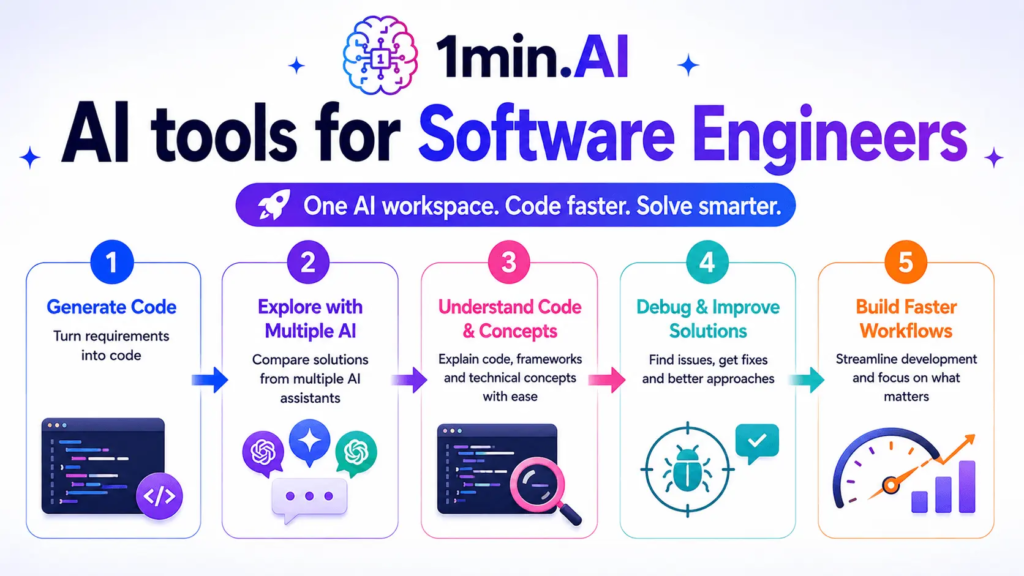
AI coding tools assist developers with writing code, explaining programming concepts, identifying errors, generating test cases, and suggesting improvements.
They can support beginners learning programming and experienced developers working on complex projects.
However, AI-generated code may contain security vulnerabilities, incorrect logic, or inefficient solutions. Developers should test, review, and understand the code before using it in production.
Popular AI Tools and Their Uses
Different AI applications specialize in different tasks. The following examples illustrate commonly known tools and their general use cases. Features and availability may change over time.
| AI Tool | Main Use | Suitable For |
|---|---|---|
| ChatGPT | Writing, reasoning, brainstorming, assistance | General users and professionals |
| Gemini | AI assistance and information tasks | Productivity and learning |
| Claude | Writing, analysis, and document assistance | Professionals and creators |
| Microsoft Copilot | AI assistance across supported workflows | Office and productivity users |
| Perplexity | Research and information discovery | Researchers and learners |
| Canva AI | AI-assisted design and content creation | Creators and marketers |
| GitHub Copilot | Programming assistance | Developers |
| Runway | AI video generation and editing | Video creators |
| ElevenLabs | AI voice and audio generation | Audio creators |
| NotebookLM | Source-based research and summarization | Students and researchers |
The most suitable tool depends on the task, budget, workflow, and required features. Users should compare current plans and limitations before selecting a platform.
How to Choose the Right AI Tool

With so many AI applications available, selecting the right one can be challenging. A tool may be impressive but still unsuitable for a particular workflow.
Important Factors to Consider
| Factor | What to Evaluate |
|---|---|
| Purpose | Does it solve your specific problem? |
| Features | Are the necessary capabilities included? |
| Ease of Use | Is the interface beginner-friendly? |
| Pricing | Does it fit your budget? |
| Accuracy | Are outputs reliable for your intended task? |
| Privacy | How is your data stored and processed? |
| Integration | Does it work with your existing applications? |
| Usage Limits | Are there restrictions on prompts, credits, or exports? |
| Support | Are help resources available? |
Smart Tips for Selecting AI Tools
- Start with a clear objective.
- Explore free plans or trials when available.
- Compare several tools before subscribing.
- Test the tool using realistic tasks.
- Check data privacy and security policies.
- Review usage limits and subscription terms.
- Avoid paying for features you rarely use.
Smart tip: A single reliable AI tool that fits your workflow can be more useful than managing several overlapping subscriptions.
How AI Tools Improve Productivity

AI tools can improve productivity by assisting with repetitive and time-consuming activities. They can help users organize tasks, summarize information, prepare drafts, and generate ideas.
Examples of AI-Powered Workflows
Content Creation Workflow
Topic Research → Content Outline → AI-Assisted Draft → Human Editing → SEO Review → Publishing
Research Workflow
Question Development → Source Collection → AI Summary → Fact Verification → Final Notes
Marketing Workflow
Audience Research → Campaign Ideas → Content Creation → Performance Analysis → Optimization
These workflows demonstrate how AI can support different stages of a process. Human oversight helps maintain quality, accuracy, and strategic direction.
Challenges and Limitations of AI Tools
Although AI tools provide useful capabilities, they also have limitations. Understanding these challenges helps users adopt AI responsibly.
| Challenge | Description | Recommended Approach |
|---|---|---|
| Inaccurate Information | AI may produce incorrect claims | Verify important facts |
| Privacy Risks | Sensitive data may be exposed | Avoid uploading confidential information |
| Bias | Outputs may reflect biased patterns | Review results critically |
| Limited Context | AI may misunderstand complex requests | Provide clear instructions |
| Overdependence | Users may rely on AI too heavily | Maintain independent judgment |
| Copyright Concerns | Generated content may raise legal questions | Review licensing and usage policies |
| Subscription Costs | Premium tools may become expensive | Compare plans and actual usage |
AI tools work best when combined with human expertise, careful review, and responsible digital practices.
The Future of AI Tools

The future of AI tools may involve more personalized assistants, advanced automation, multimodal capabilities, improved research systems, and deeper integration with everyday applications.
AI tools are likely to become increasingly capable of understanding text, images, audio, video, and structured information together. This may create more natural digital experiences and simplify complex workflows.
Businesses may adopt AI to support customer service, analytics, operations, and content development. Individuals may use AI assistants to manage tasks, learn new skills, and organize personal activities.
However, future development will also require stronger attention to privacy, transparency, reliability, and ethical use. The most valuable AI applications will be those that solve real problems while supporting human creativity and decision-making.
AI tools are changing the way people create, learn, communicate, and work. From writing assistants and image generators to research platforms, coding applications, and automation systems, AI offers a wide range of opportunities to improve digital productivity.
Choosing the right tool requires understanding its features, limitations, pricing, and privacy policies. By using AI responsibly, verifying important information, and combining technology with human judgment, users can make the most of these powerful digital solutions.
AI is not simply about automating tasks. It is about discovering smarter ways to work, exploring new creative possibilities, and building more efficient digital experiences.
Frequently Asked Questions (FAQs)
1. What are AI tools?
AI tools are software applications that use artificial intelligence to assist with tasks such as writing, research, design, coding, analysis, and automation.
2. Are AI tools free to use?
Some AI tools offer free plans, while others require paid subscriptions or provide limited free access with premium features.
3. Which AI tools are useful for beginners?
General AI assistants, AI writing tools, design applications, and research platforms can be useful starting points for beginners.
4. Can AI tools improve productivity?
Yes. AI tools can help with brainstorming, summarization, repetitive tasks, content creation, and workflow organization.
5. Are AI-generated results always accurate?
No. AI tools may produce incorrect, incomplete, or misleading information. Important results should always be verified.